Blog · Tools worth using
Tools worth using: Tailscale, the private network we reach everything through
· Matt, founder of Anvil Digital
- router ports opened for any of it
- 0
- private services we reach through it
- 6
- devices on our network
- 4
- on the free plan
- $0
This is the first post in a series about tools we rely on at Anvil Digital and think other small businesses should know about. Nobody pays us to write these, and there are no affiliate links. If we recommend something, it’s because we use it every day.
First up is Tailscale, because almost everything else we run depends on it.
The problem it solves
Like a lot of small businesses, we keep some things on our own hardware: a small server that runs our operations dashboard, our AI coding agents, a test database, our uptime monitor for SmartPark and the server that sends alerts to my phone. None of that should be on the public internet. All of it needs to be reachable when I’m not at my desk.
The usual answers both have a cost:
- Open a port on the router. Quick, and it puts your service in front of every scanner on the internet, which will find it within hours. Each forwarded port is one more thing that has to be patched and password-protected perfectly, forever.
- Run a traditional VPN. Safer, but you still open a port for the VPN itself, and you take on certificates, client configs and a box to maintain.
In October we audited our router and took out every old port forward that pointed at the server. With Tailscale, nothing we use for work needed one.
What it is
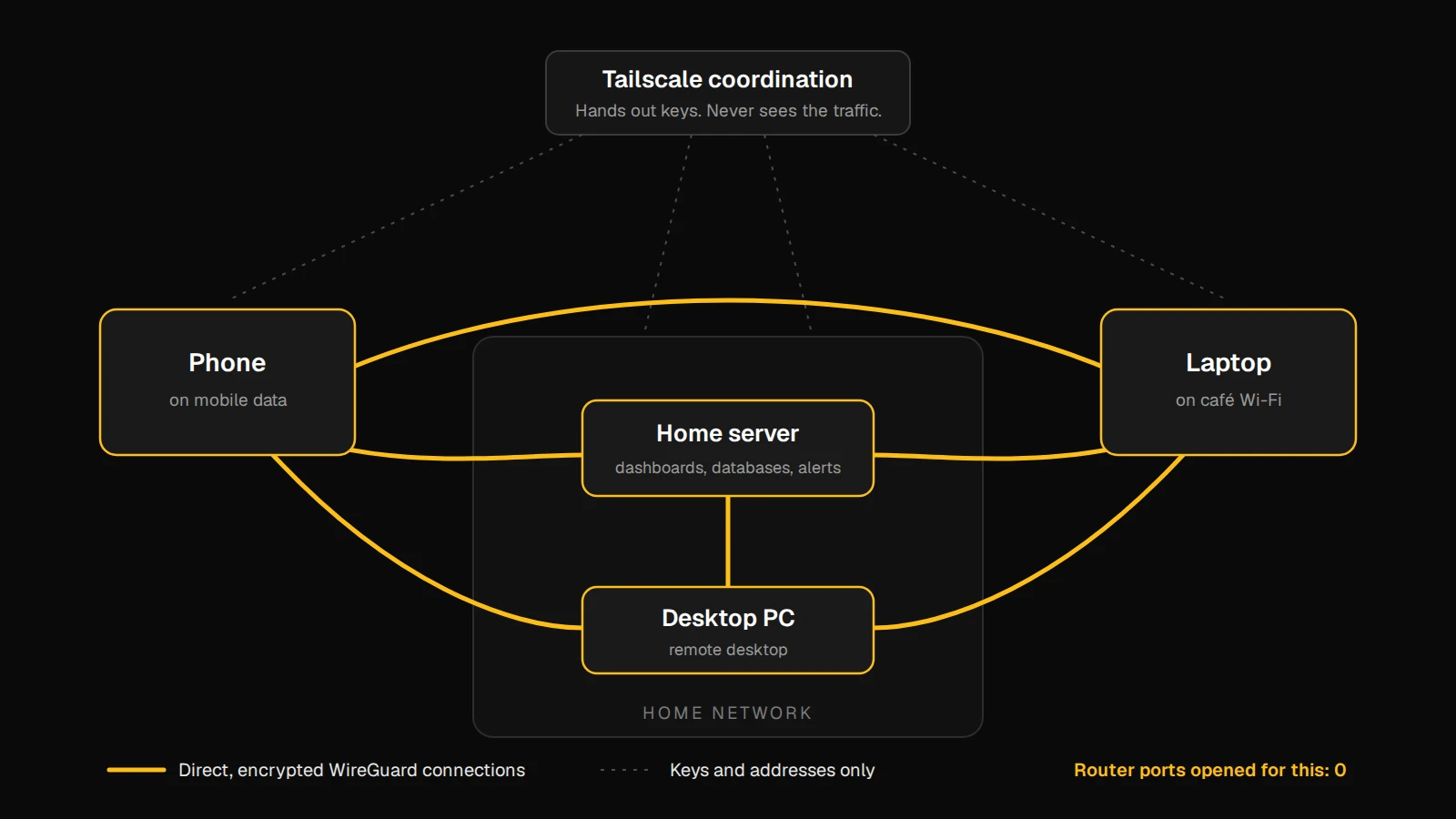
Tailscale builds a private network out of the devices you sign in to it. You install the app on a laptop, a phone, a server, sign in with an account you already have, and each device gets a private address and a name. From then on they can reach each other as if they were on the same office network, wherever they actually are.
Three things make it work better than it has any right to:
- It’s built on WireGuard, a modern, fast, well-reviewed encryption protocol. Traffic is encrypted end to end between your devices.
- Connections are direct. Tailscale works out how to get two devices talking through home routers, office firewalls and mobile networks without you opening anything. When a direct path is impossible it falls back to a relay, and the traffic is still encrypted so the relay can’t read it.
- Tailscale’s own servers only handle introductions. They hand each device the others’ public keys and addresses. Your private keys stay on your devices and your traffic doesn’t pass through them.
The part I appreciate most is that it’s boring. I set it up once on each machine, and since then it has just been there.
How we use it
Approving an AI agent's work from my phone
Our AI coding agents run on a small server of our own and ask before they change a file. The request lands on my phone, and I can look at the change and approve it from anywhere, on mobile data, without that dashboard ever being on the internet.
Alerts that never leave our network
Our push notification server, which tells me when SmartPark is down or a background job fails, is self-hosted and only answers on the private network. No third-party push service sees the alerts.
Dashboards and uptime history
Our operations dashboard and the uptime page for SmartPark run on that same server. On Tailscale they're one bookmark away from any device I own, and invisible to everyone else.
Remote desktop between our own machines
Instead of a commercial remote-desktop service, we run our own, and it only listens on the private network. Nothing to forward on the router, and no outside company in the middle.
A terminal on the server
SSH from a laptop anywhere, by name instead of an IP address that changes whenever the internet provider feels like it.
The first one changed how I work. I can start a piece of work with our AI agents at my desk, go out, and approve the next step from my phone when it asks. The approve button only works when the phone is on our private network, which is exactly the point: the dashboard behind it has no business being reachable by anyone else.
What it costs
The free Personal plan covers what we’ve described: as of this writing, up to six users with no limit on their own devices, and nearly every feature. Paid plans for teams start at US$8 per user per month. Tailscale has changed its plans before, so check their pricing page for the current details rather than trusting a blog post, this one included.
Five things to get right
Tip 1
Sharing a device shares all of it
Anyone you share a machine with can reach every service on it unless you write access rules. If you invite anyone else to your network, set up access rules (Tailscale calls them ACLs or grants) on day one, not after.
Tip 2
Turn off key expiry on servers you can't sit in front of
Each device's key expires after a while (180 days by default) and needs a fresh sign-in. That's a good default for laptops and phones. For a server with no screen, an expired key means you can't reach it remotely to fix it, so we turned expiry off for that one machine.
Tip 3
Tell your firewall about it
Tailscale traffic arrives on its own network interface. On our Linux server the firewall rules name that interface explicitly, next to the local network, so a private service is open to our own devices and closed to the rest.
Tip 4
Funnel is a different thing
Tailscale has a feature called Funnel that publishes a service to the whole internet. It's useful, and it's the opposite of everything above. We have a standing rule, for people and for our AI agents alike: no router port forwards and no Funnel without an explicit yes from me.
Tip 5
API keys expire
If you script against Tailscale's API, its access tokens last 90 days at most. Put the renewal in your calendar the day you make one.
Who should use it
If any of these sound familiar, give it an afternoon:
- You have a file server, camera system or back-office computer at the office, and staff who work from home.
- You’ve opened ports on your router so a vendor or an app can reach something inside.
- You pay for a remote-desktop service mainly to reach your own computers.
- You run anything on a home or office server that you want to use from your phone.
It isn’t the tool for publishing a website or an app to the public. For that you want proper hosting. And if you’d rather not depend on Tailscale’s servers at all, Headscale is an open-source, self-hosted replacement for the coordination part that works with the same apps.
If you’d like help putting it in place, or with the software that runs behind it, talk to us.
Want your systems reachable, and only by you?
Custom web and mobile software for businesses in Ontario.
Not sponsored: Tailscale didn’t ask for this post and we get nothing for it. Written with help from Claude, from our own setup notes, and edited by me.