
Blog · Coming to SmartPark
Coming to SmartPark in early 2027: drive the lot and let the phone read the plates
· Matt, founder of Anvil Digital
Today, an officer patrolling a condo lot on SmartPark checks plates one at a time. They take a photo, the app reads the plate, and SmartPark checks it against every resident vehicle and visitor permit at the property before a ticket is written. It’s accurate, and on a lot with a hundred cars it’s a lot of walking.
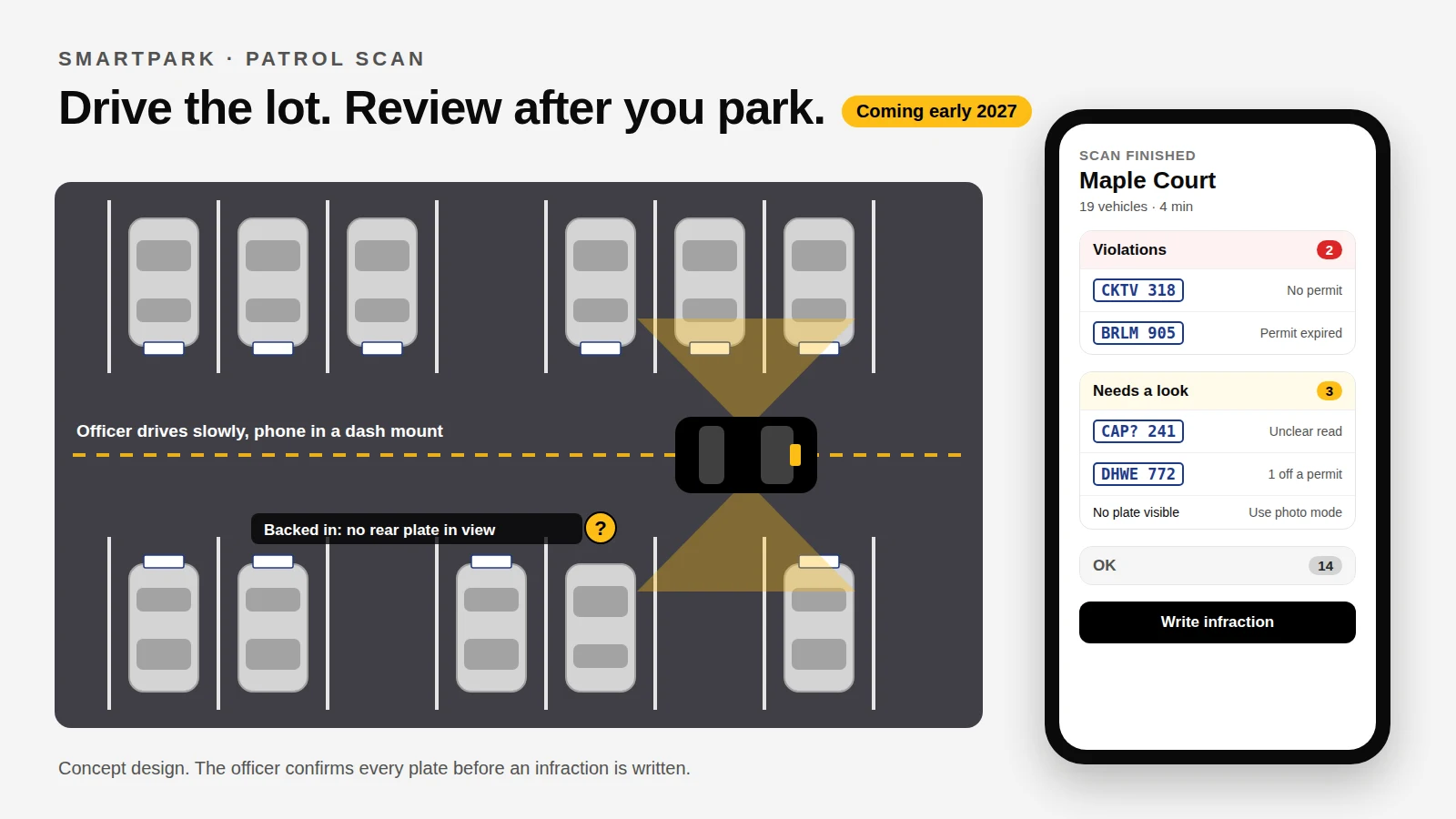
We’re building a faster way to do the sweep. Patrol Scan lets an officer drive slowly through the lot with the phone in a mount, reads every plate it can see on the way, and has the list of problems ready by the time they park. We’re aiming to release it in early 2027, and we’re looking for agencies to test it on real lots before then.
How it will work
Step 1
Check in and start the scan
The officer checks in at the property as they do today, then taps Start Scan beside Write an infraction. The phone goes in a dash or window mount.
Step 2
Drive the aisles
Drive slowly through the lot. The phone reads every rear plate it can see on both sides. Nothing on screen needs a tap while the car is moving: a live count and a short tone for each new plate say it's working.
Step 3
Park and end the scan
Tap End Scan, or let it end on its own after the car has been still for a while.
Step 4
Review the list
Every plate has already been checked against the property's resident vehicles and visitor permits. The officer gets a short list sorted by what needs attention, not a wall of plates.
Step 5
Write the infractions
Tap a violation, confirm or correct the plate, and the app opens the infraction screen officers already use, filled in with the plate, the photo and the time it was read.
What the officer sees after the scan
The point of the review list is that an officer spends their time on the few cars that matter. It’s grouped three ways:
Violations
No permit, an expired permit, or a car registered at a different property.
Needs a look
Plates the phone wasn't sure about, plates one character off a valid permit (a typo on the resident's side, or a misread), and vehicles it saw with no readable plate.
OK
Resident vehicles and visitors with a valid permit. Collapsed, so they stay out of the way.
The officer stays in charge
Patrol Scan never writes a ticket by itself. Every plate is confirmed by the officer before an infraction is created, and the officer can correct a misread on the spot. Plate readers make mistakes, especially on dirty, angled or bent plates, and a wrong ticket costs an agency far more in disputes and goodwill than the few seconds it takes to check.
The infraction itself is the same as one written today: tied to the officer’s check-in, with photo evidence and the time the plate was read. That means it goes through the same dispute process and shows up in the same reports for property management as every other infraction in SmartPark.
Photo mode isn’t going anywhere
Ontario cars only have a rear plate. A car parked nose-in shows its plate to the aisle; a car that’s backed in doesn’t, and no camera driving past can read it. Patrol Scan lists those vehicles under “Needs a look” so the officer knows to walk over, and the one-photo flow officers use today stays exactly as it is for those cars, for close-up evidence and for anywhere a drive-through doesn’t fit.
Built for the way patrols actually go
- Underground and out of signal. Plates are read on the phone itself, not sent off to a server first, so a parkade with no signal doesn’t stop a scan. Infractions are saved on the phone and sent when it’s back online, as they are today.
- Hands off while driving. No buttons to press while the car is moving, large high-contrast screens, and sounds instead of things to read.
- A real lot, not a demo. Glare, rain, night, a plate frame from the dealership: we want to know how it does in all of it before anyone relies on it. That’s what the pilot is for.
- Power. Reading a live camera feed is hard work for a phone. We’ll recommend a mount with a charger for long patrols.
Privacy
Driving past a lot means reading the plates of cars that are parked legitimately, and we treat that seriously. Pictures of vehicles with a valid permit will be kept for a much shorter time than infraction evidence, and deleted automatically. Like the rest of SmartPark, scan data is stored in Canada, and an agency only sees the properties it patrols.
Help us test it
Before Patrol Scan is released, we want to prove it on real lots with real patrols. We’re looking for a few Ontario parking enforcement agencies to try it early, tell us what it gets wrong, and help shape the review screen their officers will use on every shift.
If that sounds like you, use the form below. And if you haven’t seen SmartPark yet, everything else it does for agencies, from permits and patrol check-ins to disputes and invoicing, is available today.
Join the Patrol Scan pilot
Tell us about your agency: roughly how many properties you patrol, and the kind of lots. We’ll reply within one business day.
Patrol Scan isn’t available yet, and details may change as we test it. Written with help from Claude, from our own plans, and edited by me.